Extract Company Email IDs Automatically from Any Website
Download a ready-to-use n8n workflow that scans company websites and extracts all available email IDs in seconds no coding required.

Feature list
🔍 Automatically scans website pages for email IDs
🌐 Works with any public company website
⚡ Extracts emails in seconds
📄 Saves results to Google Sheets
🔁 Handles multiple URLs in bulk
🧠 Smart filtering to avoid duplicates
🧩 Easy to modify and extend
🚀 Ready-to-use n8n workflow
Introduction
This automation helps you instantly extract email addresses from any company website using just the website URL.
Instead of manually opening pages like Contact Us, About Us, or Footer, this workflow automatically scans the website, detects email patterns, and saves the results for further use.
Perfect for:
Lead generation
Sales prospecting
Market research
Outreach automation
Built using n8n, this workflow is fast, reliable, and fully customizable.
Use cases
🧑💼 Sales teams collecting leads
📧 Email outreach & cold campaigns
🏢 B2B company data extraction
📊 Market & competitor research
🧑💻 Freelancers & agencies
🤖 Automation enthusiasts using n8n
If you work with website data — this workflow saves hours of manual work.
Price - 15$
🔥 18+ people already using this
⭐ Rated 4.9/5 (coming soon)
⏳ Saves 3-5 hours per week
- JSON Workflow File
- Setup Steps Guide
- Google Sheet Template
- Free Lifetime Updates
🔐 Secure Payment
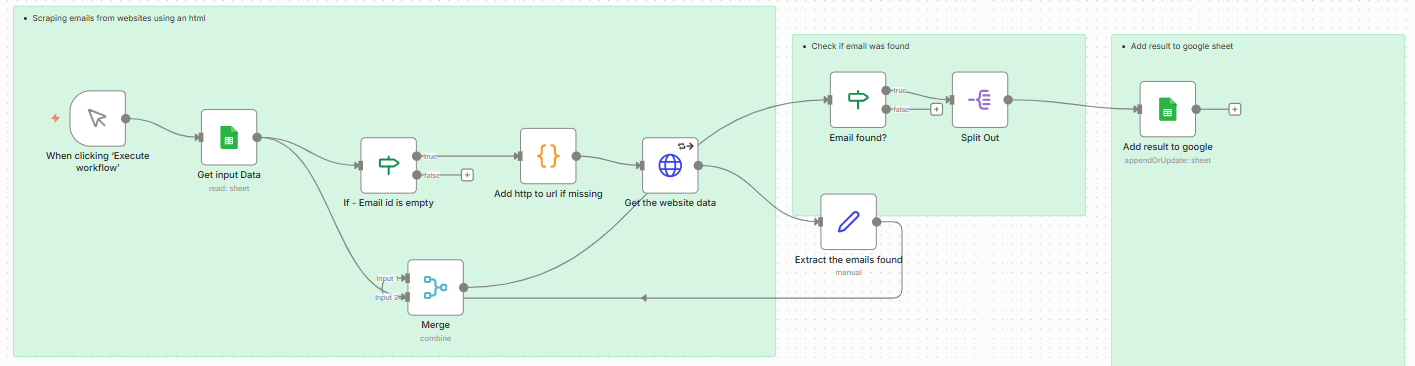
Workflow Preview
Lorem ipsum dolor sit amet, consectetur adipiscing elit. Ut elit tellus, luctus nec ullamcorper mattis, pulvinar dapibus leo.
Setup Instructions
Get started in less than 5 minutes 👇
1. Prerequities
- n8n installed (cloud or self-hosted)
- Google account
- Basic understanding of workflows
2. Import Workflow
- Download the JSON file
- Open n8n → Import workflow
- Upload the file
3. Configure Inputs
- Add website URLs
- Connect Google Sheets
- Set API Keys (if required)
4. Run the Workflow
- Click Execute
- Emails are extracted automatically
- Data saved in Google Sheet
5. Customize (Optional)
- Add filters
- Modify extraction logic
- Connect CRM or email tools
FAQ's
No. This workflow is plug-and-play. You only need to import and run it.
It works on most public websites that display email addresses.
It extracts emails from publicly accessible pages only.
Yes. You pay once and get lifetime access.
Absolutely. You can customize or extend it inside n8n.
Yes. All future improvements are included for free.
Yes. You’ll get basic setup support if needed.